Tidio offers a system that will automatically detect the best time to upgrade your plan if you're already subscribed. The auto-upgrade feature exists to help avoid interruptions in your services, e.g. being unable to respond to chat messages, or having your automated flows deactivated.
Your project can be upgraded automatically when you reach either the live conversations limit, the Lyro AI agent limit, or the flow limit. You will be notified when you're close to reaching any limit, before your subscription gets updated. Of course, you have the option to disable the auto-upgrade feature, and you are always able to modify your subscription manually as well.
However, automatic upgrades do not apply to all Tidio subscriptions; this article will tell you more about all the important details you should know.
In this article, you will learn:
When can your subscription be upgraded automatically?
The automatic upgrade only takes place if you've already purchased a subscription. Naturally, an upgrade like this cannot happen if you're using the free version of Tidio, or if your project is still in its free trial period. There are some other limitations on how the automatic upgrade works, though.
The automatic upgrade only applies to Tidio projects that are subscribed to a standard (non-Plus) monthly plan. In addition to that, the upgrade only takes place if you've reached either the live conversations limit, the Lyro AI agent limit, or the flow limit; your Campaigns limit is not considered here at all (please note: the Campaigns tool is only available for Plus or legacy Campaigns subscribers).
To summarize, your subscription will not be upgraded automatically if:
- You're using Tidio for free
- You've disabled the automatic upgrade option
- You are subscribed to any annual plan
- You are subscribed to any Plus plan
- You've only reached the monthly Campaigns limit
How do automatic upgrades work?
Apart from the requirements described above, an automatic upgrade will take place when you've reached 95% of your monthly quota (for live conversations you've handled, visitors reached by flows, or Lyro AI agent conversations). It does not happen immediately, however.
80% of quota used - alert
First, you will be notified about having reached 80% of your quota. This serves as an alert for you, so that you're aware of almost reaching a monthly limit of some kind. The email notification includes a link for you to quickly edit your current subscription, if you wish.
Here's what the email notification may look like:
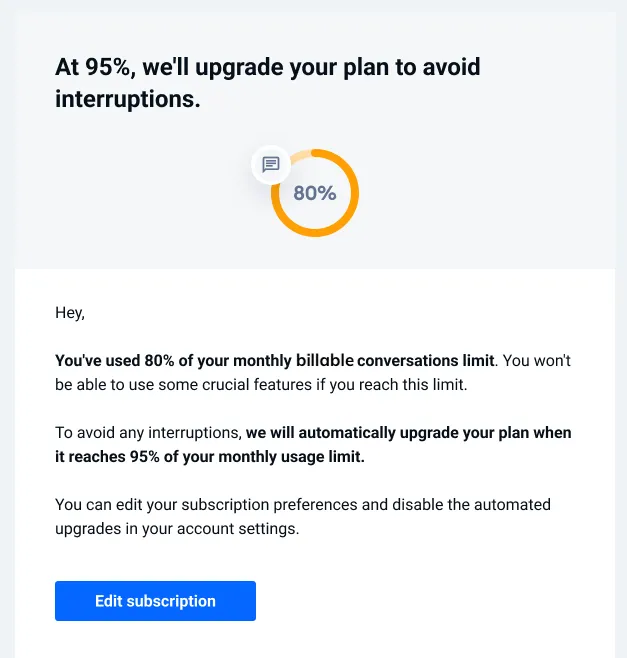
You will see a similar notification directly in your Tidio panel - a bar at the top that tells you how much of your limit you've used and that At 95%, we'll upgrade your plan to avoid interruptions., with an Edit your subscription link - and you can manually take action to upgrade your subscription or modify it any way you like (this includes the option to disable automatic upgrades as well; more on that in the next section).

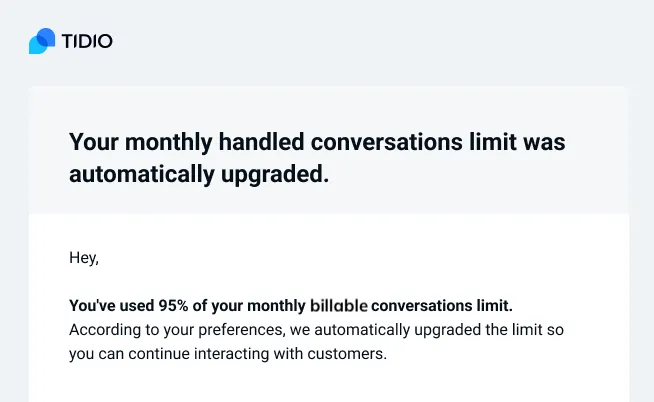
95% of quota reached - automatic upgrade
If you use 95% of your quota, the auto-upgrade will activate. The package in question will automatically update to the next level (e.g. your Customer Service package can upgrade from 250 billable conversations to 400).
You will be informed about this event via email:
Disabling automatic upgrades
If you prefer not to get automatic upgrades, you can simply disable this feature. You will keep getting notified about reaching (and nearly reaching) your monthly limits, and you will be able to upgrade your subscription manually - as usual.
Head over to Settings > Project > Billing and, on the Subscription tab, see the option labelled Automatically upgrade the limit once it's reached. It is visible under any package that supports automatic upgrades (i.e. Customer service, Flows, and Lyro AI Agent):
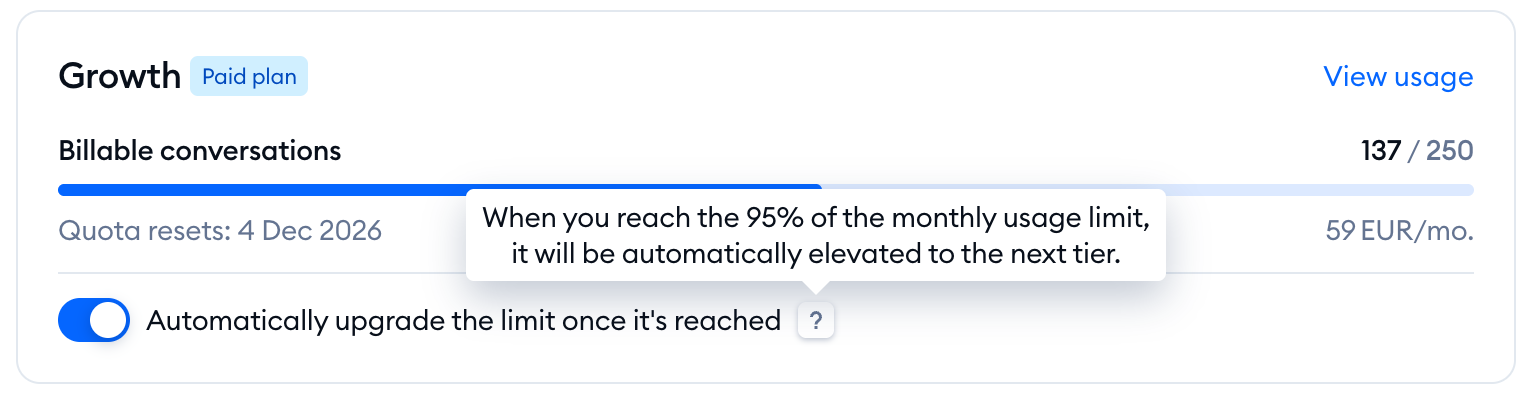
Simply turn the switch off - the change is saved right away, and you'll see the message Automatic upgrade is disabled.
You'll find the same switch under each package on the Checkout page when you edit your subscription - via Edit subscription in the Usage and plan menu, the Edit your subscription link in the panel notification, or the link included in an email notification:
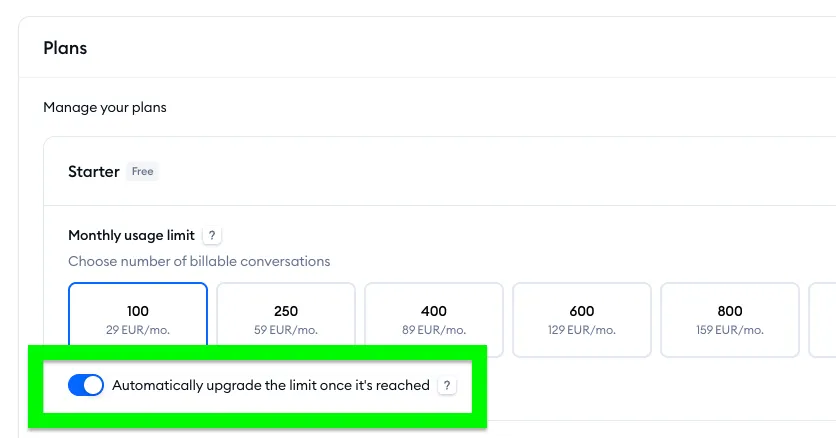
As mentioned earlier, this option is enabled by default - but you're able to deactivate it anytime you wish.
Please note: the switch isn't shown if you pay annually, if a package is already at its highest level, or if you're on a custom plan.
