Tidio sends all the contact data collected during conversations held in Tidio (such as email, name, and phone number) to your Shopify admin panel automatically.
This contact information will be found in the Customers tab in your Shopify admin panel. Every time you update a contact's name, email, or phone in Tidio, we will update them in your Shopify panel as well.
In this article, you'll learn:
- How to turn sending contacts to Shopify on or off
- Which contact details Shopify accepts
- How to import your Shopify customers into Tidio
Turning the sync on or off
Sending contacts to Shopify is a simple switch. Head over to the Customers section of your Tidio panel, and look at the bottom of the menu on the left: you'll find the Send contacts to Shopify toggle there. Switch it on to send your contacts to Shopify, or off to stop sending them:
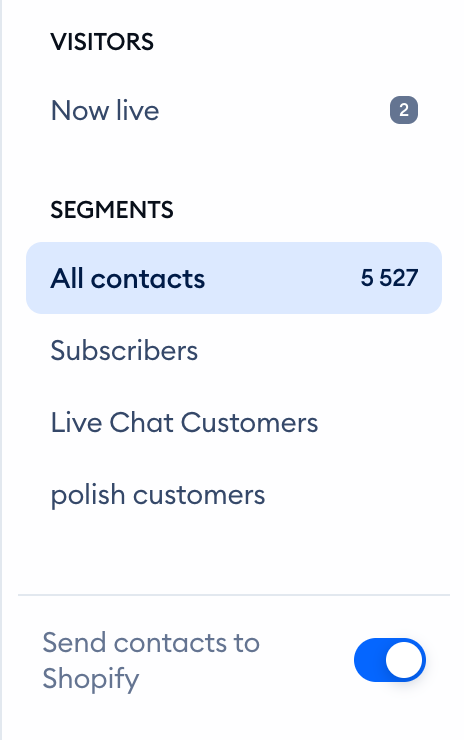
Please note: the Send contacts to Shopify toggle shows only when your Tidio project is connected to a Shopify store.
Format
Since Shopify has a strict policy on the format of phone numbers and email addresses, it is possible that a user who posted a random number like 111 111 111 may not come through and may not be updated in Shopify. Here's more about the accepted phone formats. The same rules affect emails - Shopify may not accept some email addresses if they come from a fictional or temporary hosting.
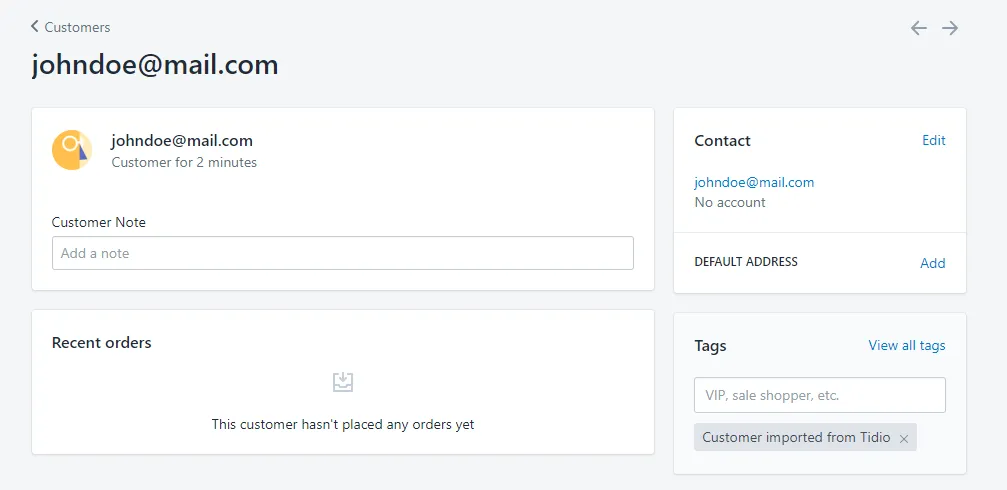
Each contact imported from Tidio will be tagged with 'Customer imported from Tidio'. Please not that any other tags (which were added to the contact in Tidio) will not be sent to Shopify.
Importing your Shopify customers into Tidio
It works the other way round, too. To bring your Shopify customers into your Tidio contacts list, open Customers > All contacts, click on Import above the list, and choose Import from Shopify. You'll find all the steps in Import Contacts into Tidio.
