Providing your website visitors with instant solutions to their queries via live chat can boost your conversion rates and, in turn, increase your revenue. But how do you know which sales Tidio actually helped with?
Instead of a single conversion rate, Tidio shows you Sales assisted - the revenue from paid orders in your store that Lyro (the AI agent), your Flows and your agents helped with. This article explains how an order gets credited to each of them, and where you can see the results.
In this article, you'll learn:
- How Tidio counts the sales it assisted
- How to check your assisted sales
- How it works if your store isn't on Shopify
How does Tidio count assisted sales?
If your Tidio project is connected to a Shopify store, Tidio matches the orders placed in your store with your customers' interactions in Tidio. Only paid orders are counted, and Tidio credits them to three sources:
- Lyro - paid orders where the shopper clicked on one of Lyro's product recommendations before buying
- Flows - paid orders after the shopper interacted with a product recommendation or a coupon in a Flow
- Human agents - paid orders placed within 7 days after the shopper chatted with one of your agents
Together, these make up your Sales assisted total. The number of these orders is shown as Orders, and their average value as AOV (average order value).
For example, let's say a shopper chats with one of your agents on Monday, and buys a jacket in your store (and pays for it) on Thursday. That order is counted under Human agents. If the same shopper had bought the jacket ten days after the chat, the order wouldn't be counted - it falls outside the 7-day window.
Please note: unpaid orders aren't counted in any of these numbers - only paid ones. Order data may take up to one hour to appear in the reports and charts.
Checking your assisted sales
There are a few places in your Tidio panel where you can see how Tidio helps you sell.
Analytics > Overview
Head over to Analytics > Overview and click on the Sales assisted tab. The chart splits your assisted sales into Sales with Lyro, Sales with Flows and Sales with agents, and shows the No. of orders as well:
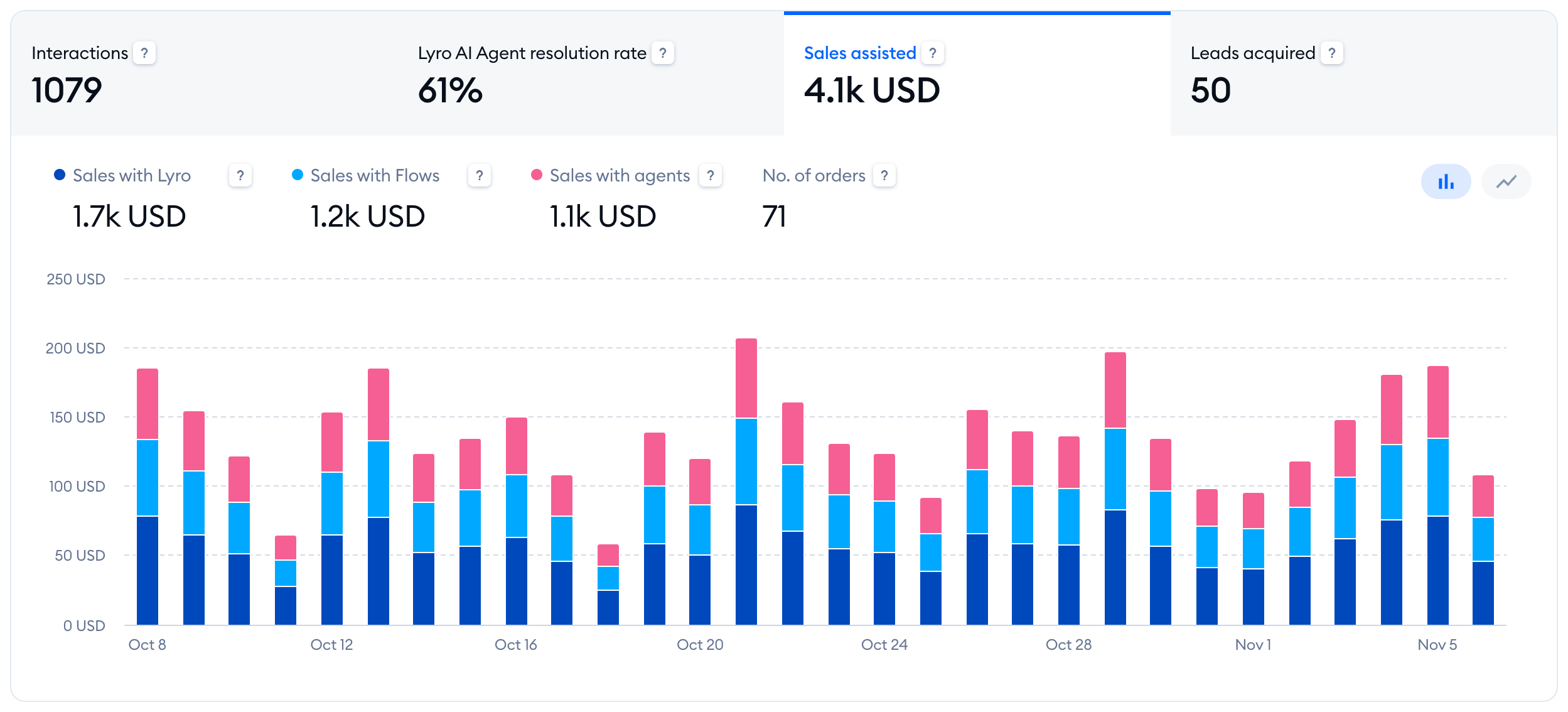
This tab is available on every plan, including Free, to everyone whose role can see sales analytics. You can see the same chart on your Dashboard, too.
Analytics > Sales
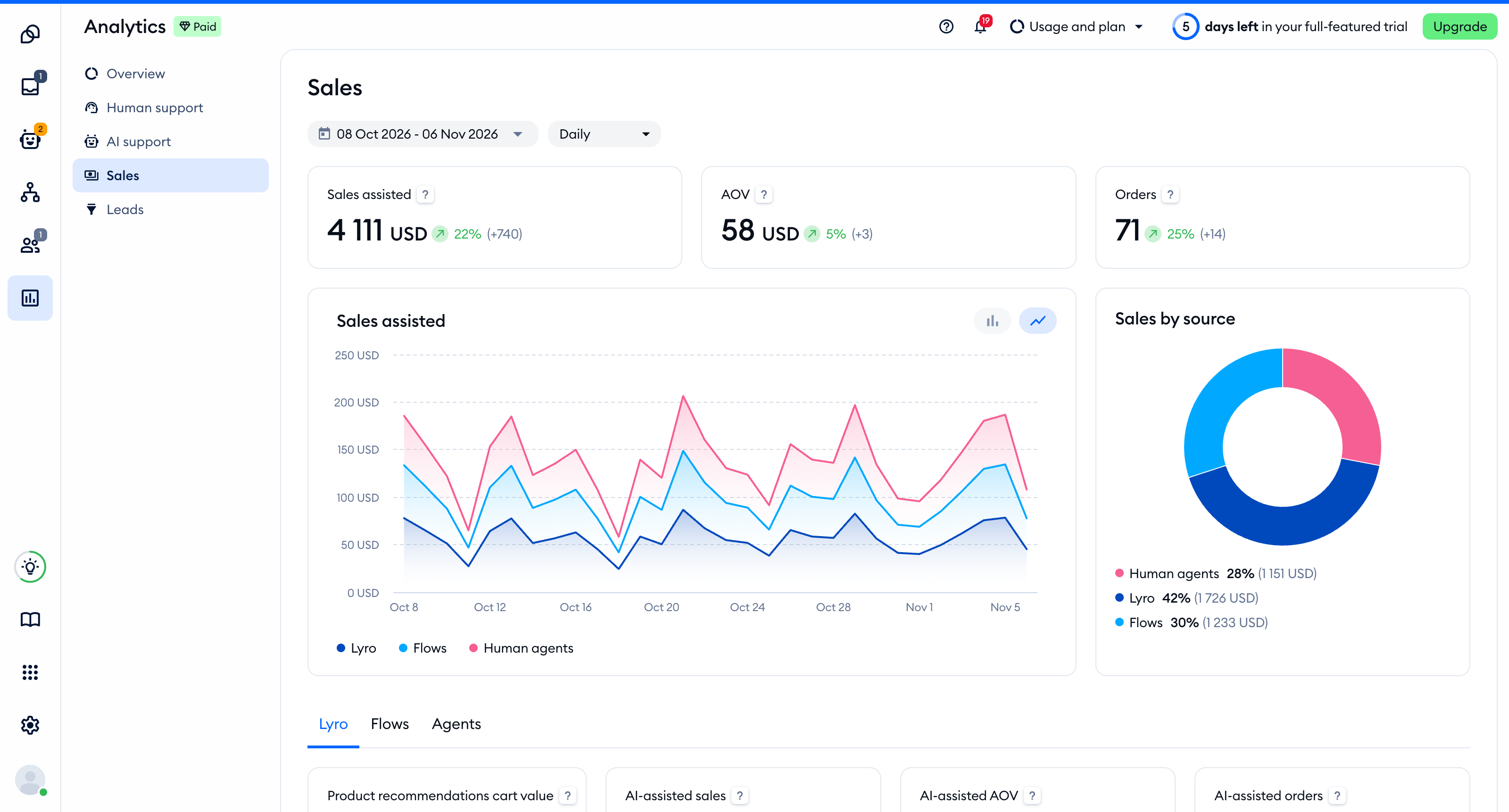
For the full picture, open Analytics > Sales. At the top, you'll find Sales assisted, AOV and Orders, followed by two charts: Sales assisted (the value of your assisted sales over time) and Sales by source. Below them, switch between the Lyro, Flows and Agents tabs to see each source on its own:
- Lyro - AI-assisted sales, AI-assisted AOV and AI-assisted orders, and the Sales conversion funnel, which shows how many of Lyro's product card answers led to a click on a card (Product card answer → Product card interaction) and how many of those clicks led to a paid order (Product card interaction → Order)
- Flows - Flow-assisted sales and Flow-assisted orders, and the Sales assisted by Flows list with the Flows that send coupon codes
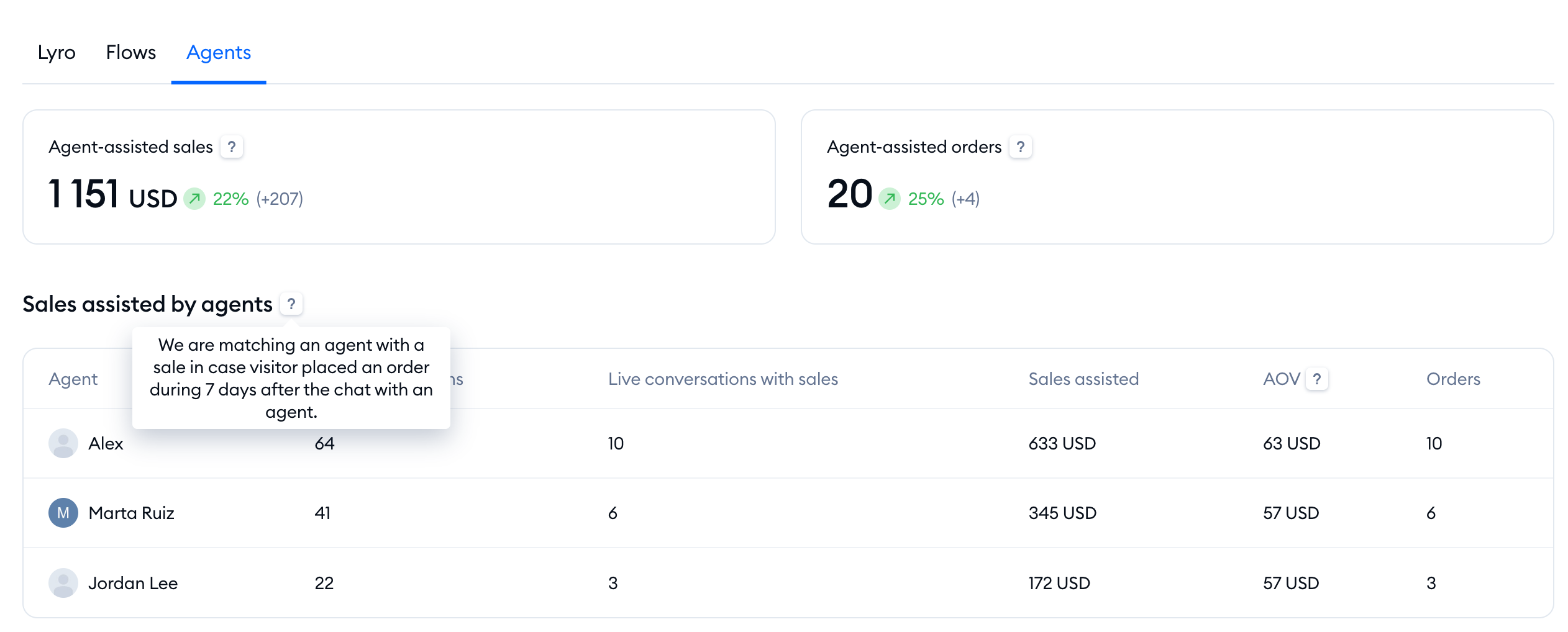
- Agents - Agent-assisted sales and Agent-assisted orders, and the Sales assisted by agents list, showing how each of your agents is doing
Please note: the Sales section is part of advanced analytics, available on the Growth plan and above. On a lower plan, clicking on it opens an upgrade window instead. The Sales assisted tab of the Overview is available on every plan.
You can read about every metric in this section in The Analytics section.
Flows > My Flows
If you use Flows to send coupon codes or recommend products, the top of your My Flows list shows how they did in the last 30 days: Coupons used/sent (codes used at checkout compared with codes your Flows sent) and Sales assisted (sales from clicks on Flow product recommendations and from used coupon codes). You'll see these two tiles if your store is on Shopify.
If your store isn't on Shopify
Revenue from orders is only available for Shopify stores. If your project isn't connected to Shopify, the Analytics > Sales section shows how shoppers respond to Lyro's product answers instead - All product answers, Product card answers, Product card interactions and the Click-through rate - without order values.
Further reading
- The Analytics section
- The Dashboard
- Product Recommendations (for Shopify)
- Coupon Code (flow action)
