When you have questions or need assistance, our Tidio Support team is here to help! In this article, we'll explain how you can easily reach out to us and explore the available support options. We value your time and strive to provide prompt and effective support to make sure your Tidio experience is seamless.
In this article, you'll learn:
- What the available support options are
- How to contact us from your Tidio panel
- Why there no Tidio phone support available for everyone
Available Support Options
Our Support Team is international and works from different time zones; we do our best to respond to your messages as fast as possible!
Here are our available support options:
- Lyro AI agent: available on our homepage (www.tidio.com) as well as inside your Tidio panel (see Contacting us from your Tidio panel below); it is a conversational chatbot whose goal is to assist you with most Tidio-related topics. Learn more about how Lyro works here.
- Email support: you can contact us anytime at support@tidio.net (we strive to respond in less than 24 hours).
- Help Center: a knowledge base where we cover almost everything there is to know about Tidio!
- YouTube: videos where we visually show how to use and troubleshoot the most common scenarios.
- Live chat: currently available only to Plus and Premium subscribers, through our homepage or your Tidio panel. You may first get an answer from the Lyro AI assistant, if Lyro will not be able to answer your question, you'll be transferred to the agent.
Contacting us from your Tidio panel
The quickest way to reach us is right inside your Tidio panel. Click the ? icon (Support) in the top bar, next to the bell icon, to open the Support menu:
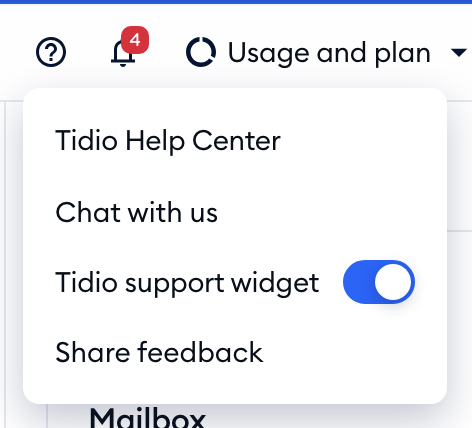
Here's what you'll find there:
- Tidio Help Center - opens this Help Center in a new tab.
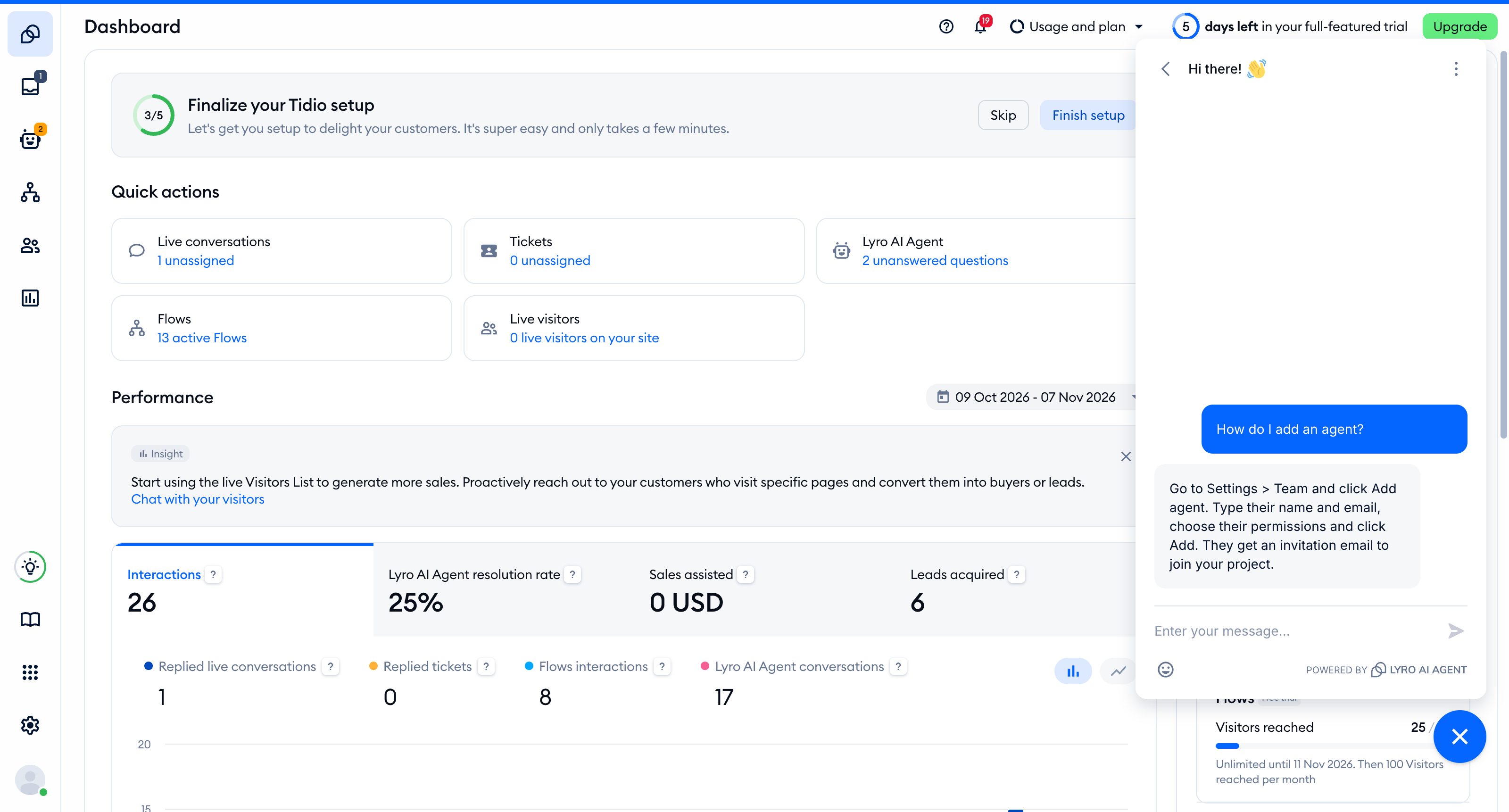
- Chat with us - opens our support chat inside your panel. You'll get an answer from Lyro (the AI agent) first - see the Live chat option above for when you're transferred to our Support team.
- Tidio support widget - a switch that shows or hides our support chat bubble in your panel. In some sections, such as the Inbox, the bubble is hidden by default so that it doesn't get in your way - simply turn the switch on (or click Chat with us) to bring it back.
- Share feedback - opens the Share your feedback window. Type your idea or suggestion in the Feedback field and hit Send. Learn more in Request a Feature and share your Feedback.
Once you click Chat with us, our support chat opens right in your panel:
Why is there no Tidio phone support?
We genuinely believe that it wouldn't be possible to provide the same effective assistance over the phone. Live chat is always one click away in your Tidio dashboard, without the need to search for a phone number, dial the number, and wait for a call. It's simpler, quicker, and doesn't interrupt your daily routine! Let us list a few more reasons behind this decision:
- Live chat allows us to provide almost immediate support --to start a conversation; you need to write to us. You're not put on hold waiting to be connected! During the conversation itself, we're able to instantly view your website, check your Tidio account and your settings. Thanks to all that, we can troubleshoot in no time.
- We can exchange files and documents easily! You customize your chat widget and flows in a user-friendly visual editor, so we'd often ask you to send us screenshots or links to see a complete picture of the issue. We'd also send you screenshots to guide you through the Dashboard or the Flow editor.
- Maintaining a call center involves investing a lot of resources! Reducing those expenses allows us to provide a free product, and... you won't pay a toll for international calls either!
- Each conversation is kept in our records, so everyone in the team is up-to-speed with the conversation. You can return to the chat anytime in the future. Even if you don't get to speak to the same agent, you won't need to repeat yourself all over again!
- And, finally, we use our product to provide customer service! It's easier for us to identify with our customers, because we're our customers, too!
FAQ
Yes. You can see maintenance and outage updates on our status page.
You can send us a feature request with Share feedback in the Support menu of your panel (see Request a Feature and share your Feedback). While our Product Team thoroughly reviews all feature requests, we don't send product updates related to those specific requests. To stay updated on what's new in Tidio, visit our blog and join our Tidio Community group on Facebook.
For any legal inquiries related to Tidio, send us an email at legal@tidio.net
Further reading
- Request a Feature and share your Feedback
- Lyro - the conversational AI agent
- Unable to Log In
