In this article, we will explore the file-sharing capabilities of the Tidio widget and the Inbox. You'll learn who can send files using Tidio, how big the files can be, and the types of files that are supported.
In this article, you'll learn:
Sending files
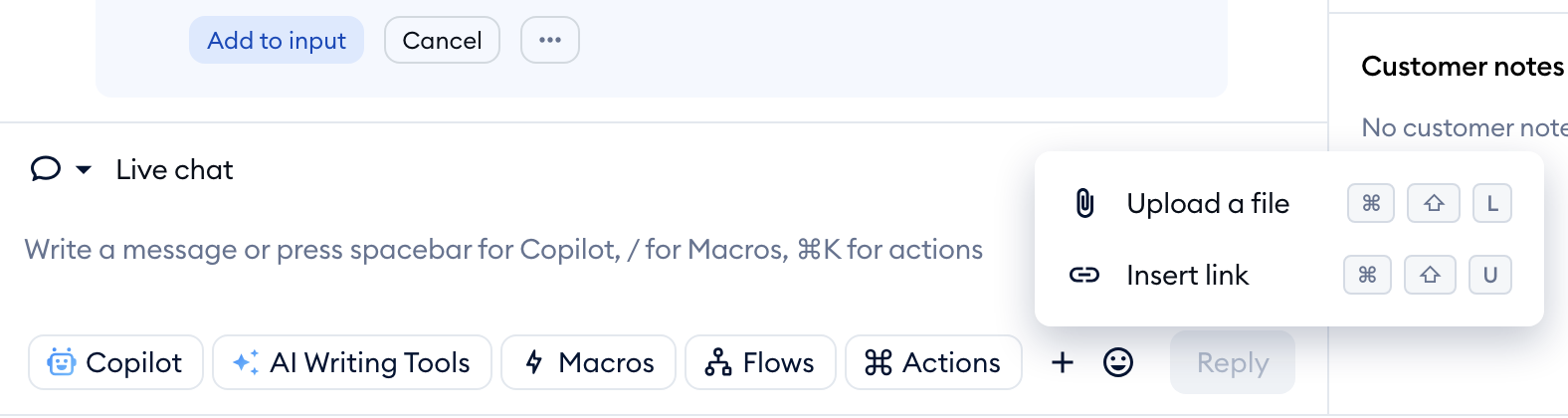
Both visitors and agents can share files through Tidio chat. Regardless of your Tidio plan, file-sharing functionality is available to everyone. To send a file, simply click on the paperclip icon in the chat widget, or the + button in the reply box of the Inbox.
For agents, the attachment option is in the reply box on the conversation screen: click on the + (Add to message) button and choose Upload a file. The same applies to the email channel (tickets), where you can also choose Upload an image to put an image right inside your reply. You can also drag and drop files onto the conversation, or copy and paste them:
The same icon is also available on the visitor's side, in your chat widget:

File size limits
How big a file can be depends on where it's sent:
| Where | One file | Number of files | All files together |
|---|---|---|---|
| Live chat - agents (Inbox) | 10 MB | Up to 10 per message | 25 MB |
| Email tickets - agents (Inbox) | 20 MB | Up to 100 per reply | 25 MB per reply |
| Live chat - your visitors (chat widget) | 10 MB (100 MB on the Plus and Premium plans) | - | - |
If a file is too big, the Inbox tells you right away - for example, File could not be uploaded: max size for one file is 10 MB. - and the file isn't attached. Your visitors see This file exceeds the 10MB attachment limit. in the chat widget.
Please note: on the Plus plan and above, your customers can upload larger files (up to 100 MB) in live conversations. The limits for agents stay the same on every plan.
Types of supported files
Below, you will find the list of supported file types:
- .jpg
- .jpeg
- .png
- .txt
- .rtf
- .xlsx
- .docx
- .gif
- .mp3
- .mp4
For security reasons, we do not allow transferring the following file types: .exe, .dmg, .mov, .rar, .zip. In the Inbox, .exe and .bin files are stopped before they upload, with the message File could not be uploaded: .exe extension is not allowed. (See the file size limits above.)
