Our new integration with GA4 allows us to send more information about user interaction with the Tidio widget. This information can be used to improve how you handle your customer support or analyze business impact. This article will show you how it can be done using custom dimensions and metrics in Google Analytics 4.
In this article, you'll learn:
- What are events and parameters
- What are custom dimensions and metrics
- How to setup custom dimensions and metrics for Tidio widget events parameters
Tidio events and parameters
The integration reports supported interactions with the Tidio widget to GA4. We also report agent and flow actions as important indicators of Tidio widget performance.
Tidio event names will follow the structure:
tidio_{{event_category}}_{{event_action}}, where:
tidio_ - is a prefix that indicates the origin of the event. It will also be a prefix for custom events sent from flows.
{{event_category}} - indicates a category. we have identified three categories:
- widget - groups actions that users can perform in a widget
- prechat - refers to actions done with regard to the pre-chat survey
- conversation - refers to actions done with regard to a conversation. These events can also be triggered by an agent or a flow, not necessarily a visitor.
{{event_action}} - refers to users/visitors, agents, automation action, e.g., started
For each event, we report parameters that can be turned into Custom dimensions or metrics depending on the type of data sent or your purpose.
Custom dimensions and metrics
Check event parameters in Reports > Realtime, which shows activity from the last 30 minutes, or in DebugView after enabling debug mode. To use custom event parameters in reports and explorations, create custom dimensions or metrics for them.
Custom dimensions and metrics allow you to add another layer to your analysis in GA based on data that are not available for standard implementation.
To create custom dimensions:
- Log in to Google Analytics
- Go to Admin
- Select your GA4 property that is integrated with Tidio
- Select Custom definitions
- Select Custom dimensions and click Create custom dimensions.
- Enter a Dimension name, select Event for Scope, and enter the exact Event parameter name.
- Click Save
You need the Editor or Administrator role to create these definitions. For numerical parameters such as rating, use Custom metrics > Create custom metric, enter the metric name and event parameter, choose the unit of measurement, and click Save. Allow 24-48 hours after creating a definition and sending data before using it in reports.
Choose only the parameters you need. Avoid custom dimensions for unique visitor or thread IDs: their high cardinality can reduce report quality. The table below keeps those IDs for reference, not as recommended custom dimensions.
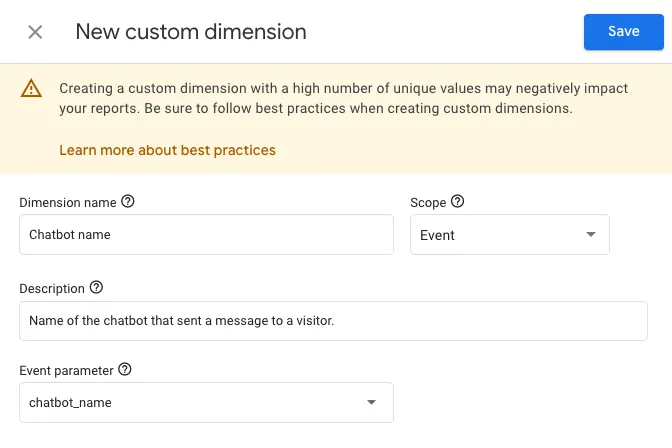
Setup custom dimensions and metrics for Tidio widget events parameters
If you want to create custom dimensions and metrics based on Tidio widget events, below, you'll find a cheat sheet with a configuration example. This will allow you to analyze user behavior based on their interaction with the Tidio widget.
Note: for rating parameters, set a standard unit of measurement. All parameters used for custom dimensions are event scoped.
GA4 Event Parameters
| Parameter Name | Type of custom definition | Dimension or metric name | Description |
| thread_id | Not recommended as a custom dimension | Tidio Thread ID | Id of a thread started. NOTE: thread_id is currently passed with rated event only. |
| visitor_id | Not recommended as a custom dimension | Tidio Visitor ID | Id assigned to a visitor by the Tidio widget. |
| message_type | Dimension | Tidio Message Type | Type of message node used in the flow. Is added if source = "chatbot" |
| chatbot_name | Dimension | Tidio Flow Name | Name of the flow that sent a message to a visitor. Is added if source = "chatbot" |
| consent_given | Dimension | Subscriber from Tidio | The user has given consent to marketing communication in the pre-chat survey. |
| phone | Dimension | Phone Number Collected in Tidio | Does the pre-chat ask for a phone number, if so was it given in the pre-chat survey? |
| name | Dimension | Name Collected in Tidio | Does the pre-chat ask for a name, if so, was it given in the pre-chat survey? |
| Dimension | Email Collected in Tidio | Does the pre-chat ask for email, if so was it given in the pre-chat survey? | |
| rating | Metric | Tidio Conversation Rating | Visitors' rating of the conversation. |
| source | Dimension | Tidio Message Source | Refers to who is responsible for a message sent to the widget. |
| operator_status | Dimension | Tidio Operators Status | Checks if any of the agents added to the project is online. If not then offline. |
With this setup, you can create custom reports, segments, audiences, and other advanced analyses inside GA4.
Further reading
About custom dimensions and metrics in the vendor help center.
