# Install Tidio on SolidStart
Section: Install Tidio
Description: Add Tidio to your SolidStart app, identify logged-in visitors and hide the chat widget on selected routes.
Verified against Tidio panel 12.331.0
Last updated: 2026-11-18
Source: https://help.tidio.com/articles/install-solidstart/
Add Tidio to your SolidStart app with one widget script. You do not need a package for Tidio. Checked with SolidStart 2.2.3.
**In this article, you'll learn:**
- [How to find your Public key](https://help.tidio.com/articles/install-solidstart/#public-key)
- [How to add the widget to SolidStart](https://help.tidio.com/articles/install-solidstart/#install)
- [How to check the installation](https://help.tidio.com/articles/install-solidstart/#check)
- [How to identify logged-in visitors](https://help.tidio.com/articles/install-solidstart/#identify-visitors)
- [How to hide the widget on some pages](https://help.tidio.com/articles/install-solidstart/#hide-on-pages)
- [How to troubleshoot the installation](https://help.tidio.com/articles/install-solidstart/#troubleshooting)
## Find your Public key
Log in to your Tidio panel and go to **Settings > Developer > Project data**. Click the **Public key** field to select its value, then copy it.
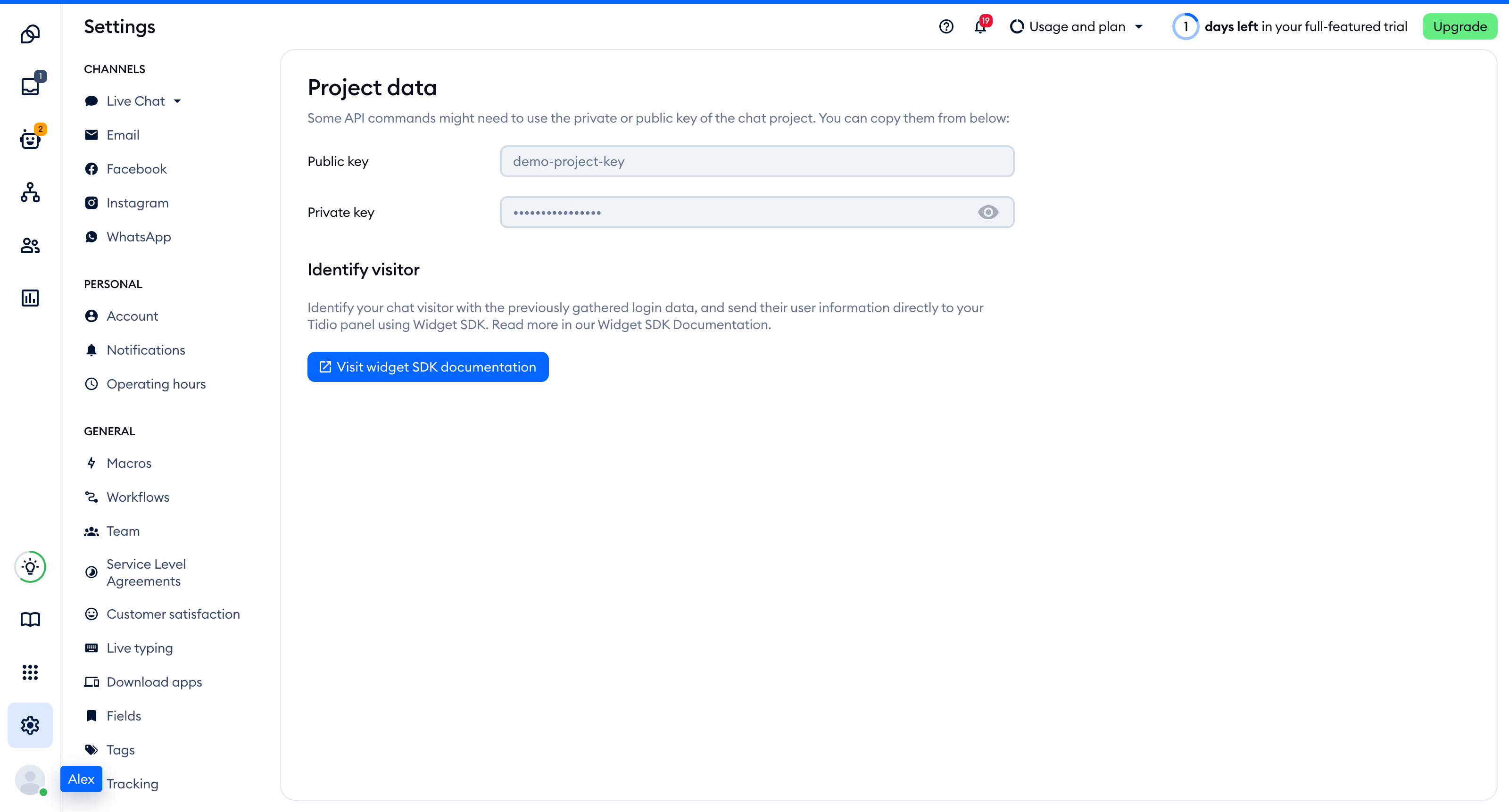
The Public key is part of the script address that every visitor's browser loads, so you can keep it in front-end code. The private key on the same page is different: never put it in your website.
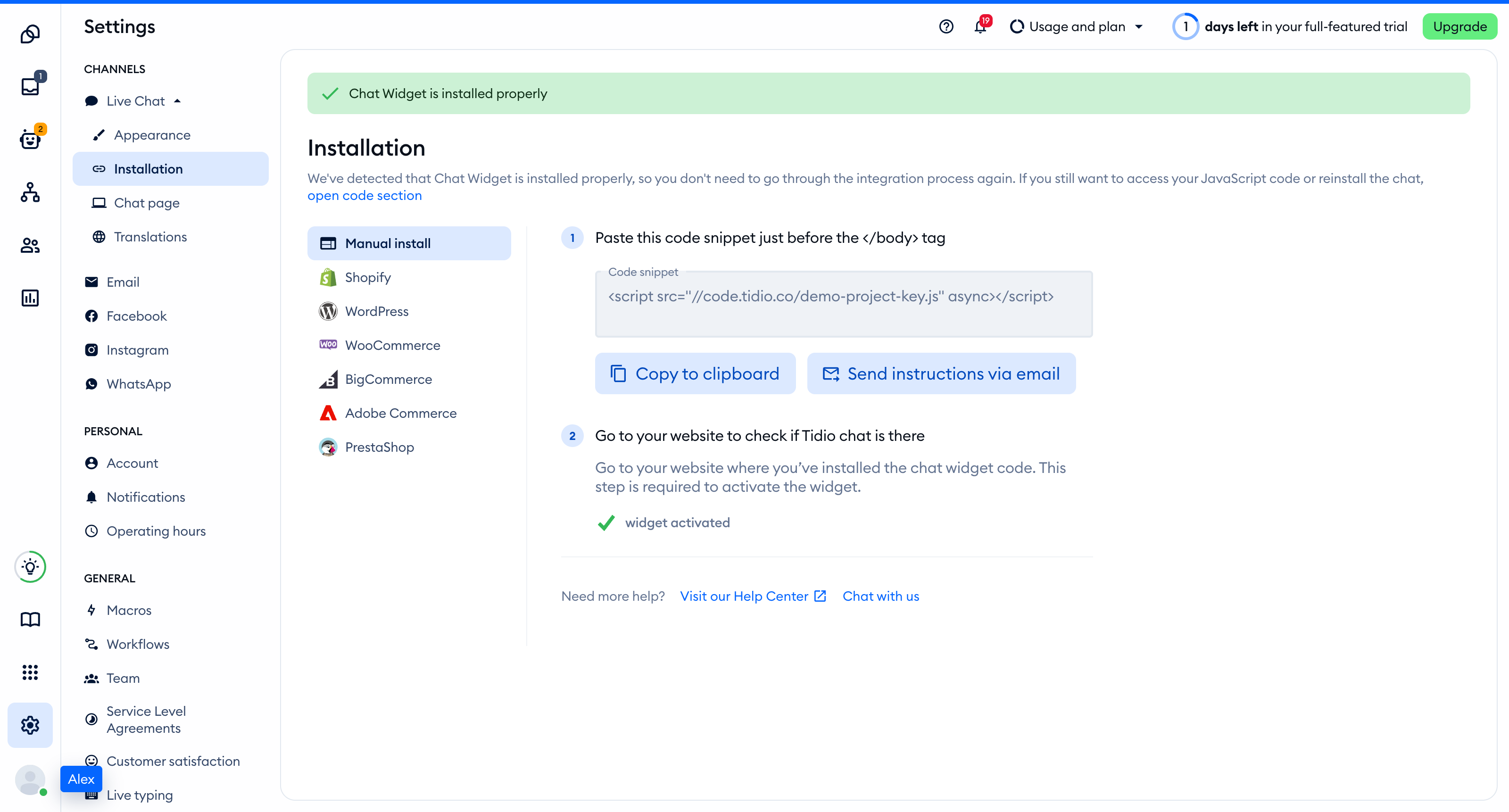
You'll find the same key inside the installation code in **Settings > Live Chat > Installation**, under **Manual install**:
```
```
## Add the widget to SolidStart
Set ` VITE_TIDIO_KEY=YOUR_PUBLIC_KEY ` in your build environment, replacing the placeholder with your Public key. Solid exposes variables prefixed with ` VITE_ ` through ` import.meta.env `. Restart the development server after changing the value, and rebuild your deployment.
Add the script after ` {scripts} ` in ` src/entry-server.tsx `. Keep your existing document metadata and assets. This minimal document loads the script once across client-side navigation:
```
import { createHandler, StartServer } from '@solidjs/start/server';
export default createHandler(() => (
(
{assets}
{children}
{scripts}
)} />
));
```
If an AI coding assistant edits this project for you, give it the prompt from [Install Tidio with an AI coding agent](https://help.tidio.com/articles/install-ai-coding-agents/).
## Check the installation
Open your site in a regular browser window. The chat widget appears in the corner of the page and stays there when you move between pages. Headless and automated browsers may not show the widget, so do not rely on them for this check.
Loading a page with the widget is what activates it. After that, **Settings > Live Chat > Installation** in your Tidio panel says **Chat Widget is installed properly**.
[Video](https://help.tidio.com/article-media/install-solidstart/walkthrough.mp4)
Silent walkthrough. A demo SolidStart site with the Tidio chat widget in the corner. The widget stays when the visitor returns to the home page and is hidden on the Checkout page.
## Identify logged-in visitors
Remove the Tidio script from ` src/entry-server.tsx ` before using this alternative. Create ` src/components/Tidio.tsx `. Its browser-only ` onMount ` callback sets ` document.tidioIdentify ` before inserting the script. Initial identification can merge conversations for the same visitor. Pass your authenticated session data, or ` null ` for an anonymous visitor. If your session loads in the browser, wait for it to resolve before mounting this component.
```
import { createEffect, createSignal, onCleanup, onMount } from 'solid-js';
import { useLocation } from '@solidjs/router';
type Visitor = { distinct_id: string; email?: string; name?: string };
declare global {
interface Document { tidioIdentify?: Visitor }
interface Window {
tidioChatApi?: {
on: (event: string, callback: () => void) => void;
display: (visible: boolean) => void;
setVisitorData: (data: { email: string; name?: string }) => void;
resetVisitor: () => void;
};
}
}
export default function Tidio(props: { user: Visitor | null }) {
const location = useLocation();
const [ready, setReady] = createSignal(false);
onMount(() => {
const onReady = () => setReady(true);
if (window.tidioChatApi) window.tidioChatApi.on('ready', onReady);
else document.addEventListener('tidioChat-ready', onReady);
onCleanup(() => document.removeEventListener('tidioChat-ready', onReady));
if (document.querySelector('script[data-tidio]')) return;
if (props.user) document.tidioIdentify = props.user;
const script = document.createElement('script');
script.dataset.tidio = '';
script.src = `https://code.tidio.co/${import.meta.env.VITE_TIDIO_KEY}.js`;
script.async = true;
document.body.appendChild(script);
});
createEffect(() => {
const path = location.pathname;
if (ready()) window.tidioChatApi?.display(path !== '/checkout');
});
return null;
}
```
In ` src/app.tsx `, import ` Tidio ` and mount it once inside the router's root. Keep your existing providers and page content. Replace ` null ` with your resolved session user when you need identification:
```
import { Router } from '@solidjs/router';
import { FileRoutes } from '@solidjs/start/router';
import { Suspense } from 'solid-js';
import Tidio from './components/Tidio';
export default function App() {
return (
(
<>
{props.children}
)}>
);
}
```
For a later login, call ` window.tidioChatApi?.setVisitorData({ email: user.email, name: user.name }) ` in your login handler after the widget is ready. This updates visitor data but does not merge conversations. Updating the component's ` user ` prop alone does not update the loaded widget.
On logout, remove the identification data before resetting the widget:
```
delete document.tidioIdentify;
window.tidioChatApi?.resetVisitor();
```
## Hide the widget on some pages
The loader above also controls visibility. Use it with ` user={null} ` if you do not need identification, and remove the original document script. Its ready listener runs before it inserts the script. The ` createEffect ` reads the reactive ` useLocation() ` pathname, hides the widget on ` /checkout ` and shows it elsewhere after client-side navigation. Keep this component in the router root rather than a route that unmounts.
Hiding the widget does not stop Flows from triggering. To load the widget only on a list of addresses instead, see [Show the widget only on specific pages](https://help.tidio.com/articles/show-widget-only-on-specific-pages/).
## Troubleshooting
- If the script address contains ` undefined ` or ` YOUR_PUBLIC_KEY `, set ` VITE_TIDIO_KEY ` before building and rebuild.
- If you load the widget twice, remove the document script when using the component loader.
- If server rendering reports that ` window ` or ` document ` is undefined, keep browser operations inside ` onMount ` and the ready-gated effect.
- If routing reports a missing context, mount ` Tidio ` inside the router root, not above ` Router `.
- If your Content Security Policy blocks the script, check the [required hosts](https://developers.tidio.com/docs/widget-security-policy).
## Further reading
- [Install Tidio on your website](https://help.tidio.com/articles/install-website/)
- [Widget SDK](https://help.tidio.com/articles/widget-sdk/)
- [SolidStart document reference](https://docs.solidjs.com/solid-start/v2/reference/server/start-server)